
Our Guide To Making Custom Badges & Magnets
Looking to design a badge for your business, event, or personal celebration? Having a template on hand allows you to quickly create customised badges with your own text, images, and colour choices. A quality badge template also ensures that your end product looks uniform and professional while doing justice to your hard work.
Whether for business events or for purely personal use, having a badge template is essential for creating multiple badges with ease. Why not streamline your project with a custom badge template? It's perfect for conveying both creativity and professionalism — no matter the occasion.
If you’re looking for how to use badge templates, this page will help you make the best use of the tools we have listed on the Make Badges website.
With over 20 years of experience, Make Badges is an Australian institution. We help communicate your creativity to the rest of the world and bring your badge ideas to life. Read on to learn more about our Design Studio and Adobe-supported templates.
Make Your Custom Magnets & Badges With Our Badge Design Studio
With Make Badges' inbuilt software, designing your badges has never been easier. The Design Studio allows you to import images directly from your device or you can also generate AI images via prompts. We also offer photo editing and filters, curved text, clipart images, backgrounds and more!
1. Choose Your Product
The first step is to simply choose the specific badge or magnet product you’re interested in. No matter the type you choose, you’ll be able to customise it as you see fit.
2. Launch The Design Studio
Once on a product page, you’ll see a large green button that reads ‘LAUNCH DESIGN STUDIO’. Click on that to launch the Design Studio pop-up. When it first loads, it’ll display a video tutorial you can watch that covers the basics of how to use it.
3. Get Creating!
Now you can get creative! Design your badge with texts, branding, or images of your choice. Enjoy the 3D feature that allows you to see what your badge looks like from every angle.
Create Your Own, Or Use A Template
Along with our Design Studio, we also welcome badge designs created through Photoshop or Illustrator. We have a range of available templates to utilise to help you out. You’ll find the option to ‘Upload a Design’ on our product pages.
When taking this approach, please be mindful of the following: Your artwork must be positioned within the inner circle (that's the face of the badge), and the background must run all the way to the edge of the image bleed area. Make sure the image is 300dpi CMYK colour.
Custom Made Badge and Magnet Template Examples
Below is an example of how to set up your artwork in our handy templates.
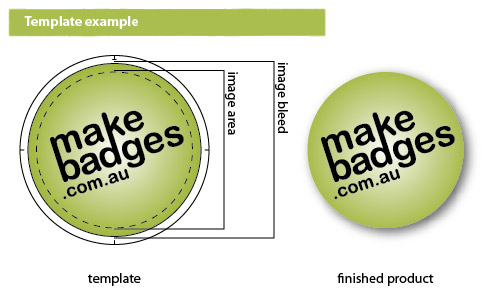
Custom-Made Badge Templates
Below is our comprehensive list of Photoshop and Illustrator templates you can use for designing your custom-made badges.
Downloadable Badge Templates
|
25mm Badge Templates PB0025 32mm Badge Templates PB0032 38mm Badge Templates PB0038 45mm Badge Templates PB0045 |
57mm Badge Templates PB0057 64mm Badge Templates PB0064 75mm Badge Templates PB0075 89mm Badge Templates PB0089 |
50x50mm Badge Templates PBSQ50 45x70mm Badge Templates PBVR70 70x45mm Badge Templates PBHR70 |


Custom-Made Magnet Templates
Below is our comprehensive list of Photoshop and Illustrator templates you can use for designing your custom-made magnets.
Downloadable Magnet Templates
|
25mm Magnet Templates MB0025 32mm Magnet Templates MB0032 38mm Magnet Templates MB0038 45mm Magnet Templates MB0045 |
57mm Magnet Templates MB0057 64mm Magnet Templates MB0064 75mm Magnet Templates MB0075 |
50x50mm Magnet Templates MBSQ50 45x70mm Magnet Templates MBVR70 70x45mm Magnet Templates MBHR70 |
Custom-Made Magnet Fastener Templates
Below is our comprehensive list of Photoshop and Illustrator templates you can use for designing your custom-made magnet fastener badges.
Downloadable Magnet Fastener Templates
|
25mm Magnet Fastener Templates MF0025 32mm Magnet Fastener Templates MF0032 38mm Magnet Fastener Templates MF0038 |
45mm Magnet Fastener Templates MF0045 57mm Magnet Fastener Templates MF0057 64mm Magnet Fastener Templates MF0064 |
75mm Magnet Fastener Templates MF0075 89mm Magnet Fastener Templates MF0089 |
Pro Tips For Designing A Great Badge
Have a Short Message
Keeping your words to a minimum will see your message go the distance. Since there’s not much space on a badge, you’re better off keeping it short and sweet. Badges with brief messages are a great way to make an impact, whether it’s a humorous quote or pop culture reference that will make people laugh or fierce call to action, make it concise and memorable.
Create a Simple Composition
Badges are a great way to show off your company's branding, but if you don't create a simple composition, it can end up looking cluttered and confusing. This is especially important if you're using badges for promotional purposes, as a complicated badge image will only distract from your message. When it comes to designing your custom badges, simplicity is key - focus on using basic shapes and colours, and keep the details to a minimum.
Keep Fonts at a Minimum of 8pts
Small fonts can be difficult to read, while overly large fonts will impact the aesthetic balance of your badge. To ensure that your badges are legible and visually appealing, the general rule of thumb is to maintain a minimum font size of 8 pts. There may be circumstances where a more creative approach is required - if that’s the case, don’t be afraid to experiment with sizes outside this recommended range. By sticking to these minimum standards of display size, you can rest assured that your badges will be easy on the eyes and still convey their message clearly.
Use Strong Contrast Between Foreground and Background
Strong badge design is about more than simply selecting the perfect illustration and complementary font. Equally important is having a distinct and visually appealing foreground and background. By using contrasting colours, techniques, or textures, you can achieve an eye-catching effect that dynamically separates the different elements of your design.
For example, pairing an intricate, detailed background with an abstract logo or minimalist text can create a pleasing contrast between the two components. Crafting badges that possess both cohesion and contrast will ensure maximum visibility, meaning your work will be noticed. Take some time to experiment with different design elements to craft unique visual combinations that are truly impactful. The results will speak for themselves!
Proof Your Design
Before you hit print on your badge design, be sure to proof it. It’s easy enough to overlook little details in the rush of preparing an urgent order. Will someone expect their name spelled with two “l's” or just one? Does the colour scheme match your brand guidelines? Is the logo properly positioned within the design? We all want our products to make a great first impression when they go out into the world, so take the time to check that everything looks perfect before printing.
A badge template is the best way to ensure your design looks polished and professional. There are many different styles of badges, from colourful and cartoonish to sleek and sophisticated.
Need Help? Follow Our In-Depth Video Tutorials
If at any point you need help with the badge design process within the Make Badges Design Studio, we have a range of video tutorials that will set you up for success - so be sure to check them out!
Design a Personalised Badge With Make Badges
Whether you’re wanting custom badges for your business, for an event, or just for personal use, it’s all possible with Make Badges.
Badges for Businesses & Professional Services
We work with businesses of all sizes to help elevate their branding and improve the customer and client experience. From custom badges and name badges to custom made magnets for keeping your business front-of-mind, we can help your business or professional service gain more visibility.
Badges for Promotions & Events
Are you running a special promotion or want to commemorate a special event? You can do just that with our selection of promotional badges and event badges, as well as other memorabilia-focused options such as custom zipper pulls and printed key rings.
Badges for Parties & Special Occasions
Got a big birthday coming up, a wedding, anniversary or other major milestone? We’ve got the badges and gifts to suit. Explore our range of personalised birthday badges, custom hen night badges, Christmas decorations, and more!