
Having a template on hand allows you to quickly create customised badges with your own text, images, and colour choices. A quality badge template also ensures that your end product looks uniform and professional while doing justice to your hard work.
Whether for business events or for purely personal use, having a badge template is essential for creating multiple badges with ease. Why not streamline your project with a custom badge template? It's perfect for conveying both creativity and professionalism — no matter what the occasion.
If you’re looking for how to use badge templates, this page will help you make the best use of the tools we have listed on the Make Badges website.
With over 18 years of experience, Make Badges is an Australian institution. We help communicate your creativity to the rest of the world and bring your badge ideas to life.
Make Your Custom Magnets or Badges With Our Badge Design Studio
With Make Badges inbuilt software to help you design your badges, making them has never been easier. The new design studio integrates with social media, allowing images to be imported directly from Facebook and Instagram. We have also added new photo editing and filters, curved text, clipart images, backgrounds and more!
Follow these simple steps to get started:
-
Choose a badge, magnet or other custom printable product
-
Click the green 'Launch Design Studio' button next to the product on the web page.
-
Design your badge with texts, branding, or images of your choice. Enjoy the 3D feature that allows you to see what your badge looks like from every angle.
For more advanced badge makers, you can use Photoshop or Illustrator to edit your creation. Upload it to the design studio and create a badge in no time.
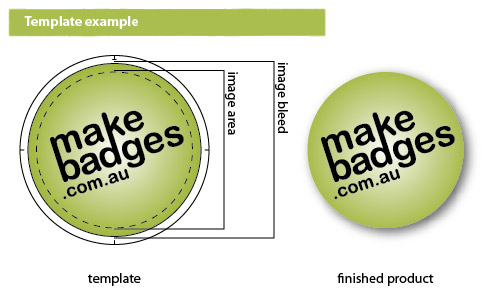
Your artwork must be positioned within the inner circle (that's the face of the badge), and the background must run all the way to the edge of the image bleed area. Make sure the image is 300dpi, grayscale or CMYK colour.
Badge Designing Made Easy
If you get stuck, Make Badges have created step-by-step tutorials on how to use the design studio. Check out our video tutorials to learn how to properly upload and edit photos or graphics on your badge.
We also have a collection of badge designs already available on the website. If you’d rather use one of our templates, go for it! It makes your process easier and ensures that you will get the sizing and details you need for your purchase. These templates are compatible with Adobe Photoshop and Illustrator and will require a little experience with the software to edit.
Custom Made Badge and Magnet Template Examples
Below is an example of how to setup your artwork in our handy templates.
Pro Tips For Designing A Great Badge
-
Have A Short Message
Keep your words to a minimum and see your message go the distance. Since there’s not too much space on a badge, you’re better off keeping it short and sweet. Badges with brief messages are a great way to make an impact, whether it’s a humorous quote or pop culture reference that will make people laugh or fierce call to action, make it concise and memorable.
-
Create a Simple Composition
Badges are a great way to show off your company's branding, but if you don't create a simple composition, it can end up looking cluttered and messy. This is especially important if you're using badges for promotional purposes, as a complicated badge image will only distract from your message. When it comes to designing your custom badges, simplicity is key — focus on using basic shapes and colours, and keep the details to a minimum. This will help you create a clean, professional look that will make a lasting impression on your audience.
-
Fonts Should Be A Minimum Of 8 Pts
Small type can be difficult to read, while overly large fonts will compromise the aesthetic balance of your badge. To ensure that your badges are legible and visually appealing, the general rule of thumb is to maintain a minimum font size of 8 pts. Of course, there may be circumstances where a more creative approach is required — if that’s the case, don’t be afraid to experiment with sizes outside this recommended range. By sticking to these minimum standards of display size, you can rest assured that your badges will be easy on the eyes and still convey their message loud and clear.
-
Use Strong Contrast Between Foreground And Background
Creating strong badge designs involves more than simply selecting the perfect illustration and complementary font. Equally important is ensuring that you have a distinct and visually appealing foreground and background. By using contrasting colours, techniques, or textures, you can achieve an eye-catching effect that dynamically separates the different elements of your design. For example, pairing an intricate, detailed background with an abstract logo or minimalist text can create a pleasing contrast between the two components. Ultimately, crafting badges that possess both cohesion and contrast will ensure maximum visibility — meaning your work will be noticed. Take some time to experiment with different design elements to craft unique visual combinations that are truly impactful. The results will speak for themselves!
-
Proof Your Design
Before you hit print on your badge design, be sure to proof it. It’s easy enough to overlook little details in the rush of preparing an urgent order. Will someone expect their name spelled with two “l's” or just one? Does the colour scheme match your brand guidelines? Is the logo properly positioned within the design? We all want our products to make a great first impression when they go out into the world, so take the time to check that everything looks perfect before printing.
Badges aren't just for children — they can be an important tool to promote your business, event, or organisation. A badge template is the best way to ensure your design looks polished and professional. There are many different styles of badges, from colourful and cartoonish to sleek and sophisticated.

